
Distillation & Deployment#
Note
This workflow is expected to work with Isaac Lab 3.0 but has not yet been tested.
Validation is planned; use UWLab v1.3.0 as the legacy reference.
This guide covers distilling a state-based RL expert into a vision-based policy, evaluating it in simulation, and deploying on a real robot.
One-Time Setup#
Evaluation and training use the diffusion_policy repo (omnireset branch). Clone it as a sibling to UWLab. If you already cloned diffusion_policy for Sim2Real: SysID & RL Finetuning, skip the clone step.
<parent_dir>/
    UWLab/
    diffusion_policy/
cd <parent_dir>
git clone -b omnireset https://github.com/WEIRDLabUW/diffusion_policy.git
Then install the dependencies into your UWLab conda environment (required even if you already cloned above):
cd <parent_dir>/diffusion_policy
conda activate env_uwlab
python -m pip install -e .
python -m pip install dill hydra-core omegaconf zarr einops "diffusers<0.37" wandb accelerate pandas
Train Your Own#
To train your own vision policy from scratch, follow the steps below.
Important
Prerequisites: If doing sim2real transfer, complete Sim2Real: SysID & RL Finetuning (system identification and RL finetuning) before collecting demonstrations. The RGB tasks expect a Stage 2 (finetuned) expert checkpoint.
Collect Demonstrations#
Step 1: Export the expert policy
Run play.py on a Stage 2 (finetuned) checkpoint to export a JIT-traced policy.pt. You can finetune your own (see Sim2Real: SysID & RL Finetuning).
conda activate env_uwlab
cd <parent_dir>/UWLab
python scripts/reinforcement_learning/rsl_rl/play.py \
    --task OmniReset-Ur5eRobotiq2f85-RelCartesianOSC-State-Finetune-Play-v0 \
    --num_envs 4 \
    --checkpoint <stage2_checkpoint.pt> \
    --visualizer none
This saves policy.pt (and policy.onnx) under <checkpoint_dir>/exported/.
Step 2: Collect RGB demonstrations
Use the exported policy.pt to roll out the expert and record RGB observations in Zarr format. Only successful trajectories are saved.
Tip
For sim2real deployment, collect 80K+ demos. For sim-only distillation (performance evaluation), 10K is sufficient. 10K demos takes ~2 hours on a 3090 GPU. 32 envs fits on 24 GB VRAM.
python scripts_v2/tools/collect_demos.py \
    --task OmniReset-Ur5eRobotiq2f85-RelCartesianOSC-RGB-DataCollection-v0 \
    --dataset_file datasets/peg/rgb0.zarr \
    --num_envs 32 \
    --num_demos 10000 \
    --visualizer none \
    env.scene.insertive_object=peg \
    env.scene.receptive_object=peghole \
    agent.algorithm.offline_algorithm_cfg.behavior_cloning_cfg.experts_path='["exported/policy.pt"]'
python scripts_v2/tools/collect_demos.py \
    --task OmniReset-Ur5eRobotiq2f85-RelCartesianOSC-RGB-DataCollection-v0 \
    --dataset_file datasets/leg/rgb0.zarr \
    --num_envs 32 \
    --num_demos 10000 \
    --visualizer none \
    env.scene.insertive_object=fbleg \
    env.scene.receptive_object=fbtabletop \
    agent.algorithm.offline_algorithm_cfg.behavior_cloning_cfg.experts_path='["exported/policy.pt"]'
python scripts_v2/tools/collect_demos.py \
    --task OmniReset-Ur5eRobotiq2f85-RelCartesianOSC-RGB-DataCollection-v0 \
    --dataset_file datasets/drawer/rgb0.zarr \
    --num_envs 32 \
    --num_demos 10000 \
    --visualizer none \
    env.scene.insertive_object=fbdrawerbottom \
    env.scene.receptive_object=fbdrawerbox \
    agent.algorithm.offline_algorithm_cfg.behavior_cloning_cfg.experts_path='["exported/policy.pt"]'
Train Vision Policy#
Train a ResNet18-MLP Gaussian policy using the collected Zarr dataset with the diffusion_policy repo (use the omnireset branch).
Training requires the robodiff conda environment (separate from env_uwlab). Create it once:
cd <parent_dir>/diffusion_policy
mamba env create -f conda_environment.yaml   # or: conda env create -f conda_environment.yaml
Then activate it and run training:
conda activate robodiff
cd <parent_dir>/diffusion_policy
python train.py \
    --config-name train_mlp_sim2real_image_with_aux_loss_workspace.yaml \
    --config-dir diffusion_policy/config \
    task.dataset.dataset_dir=<path_to_dataset_dir>
dataset_dir is a folder containing one or more Zarr files produced by the data collection step:
dataset_dir/
    rgb0.zarr
    rgb1.zarr
Multiple Zarr files are merged automatically, so you can split collection across runs.
Tip
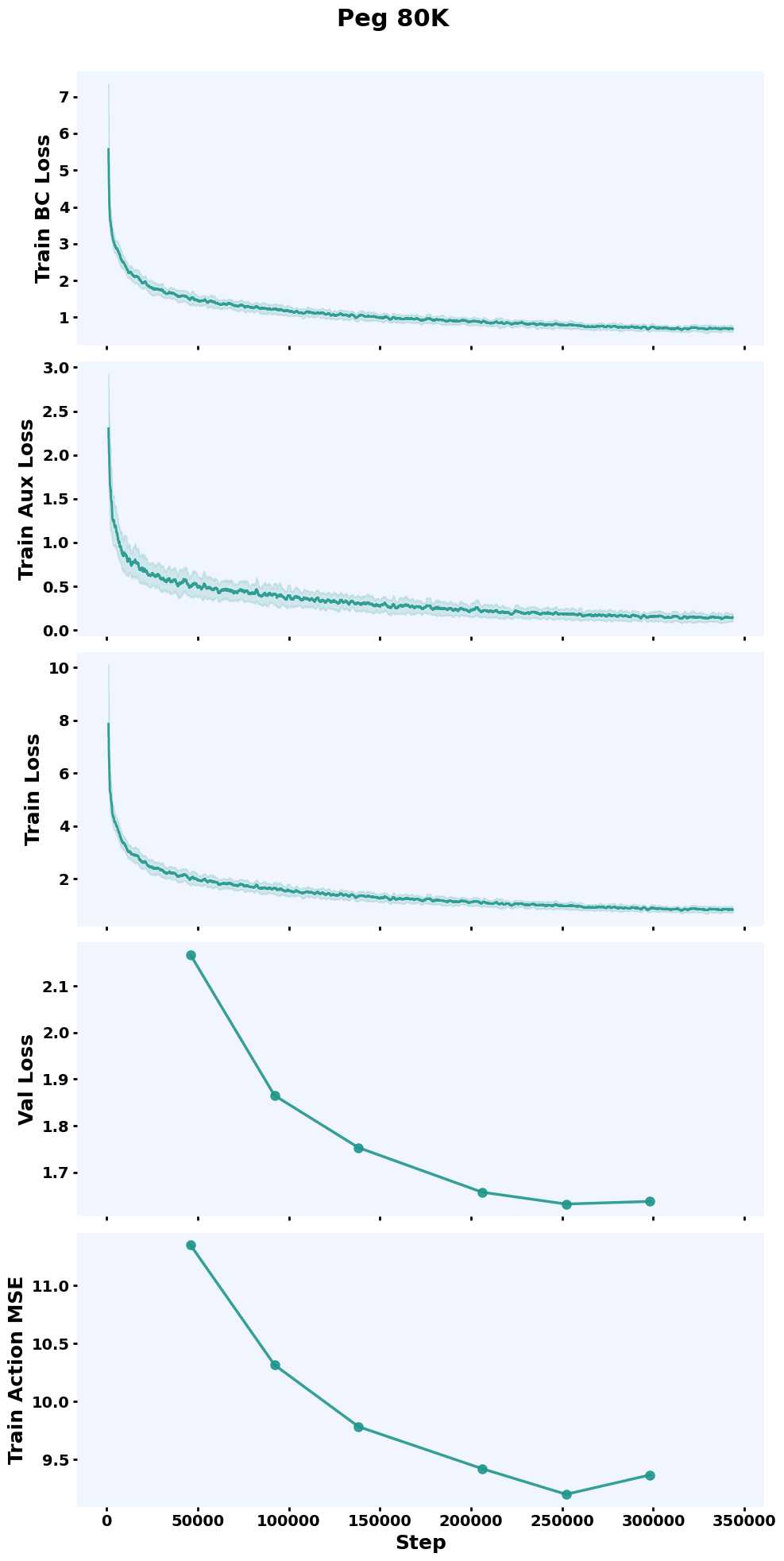
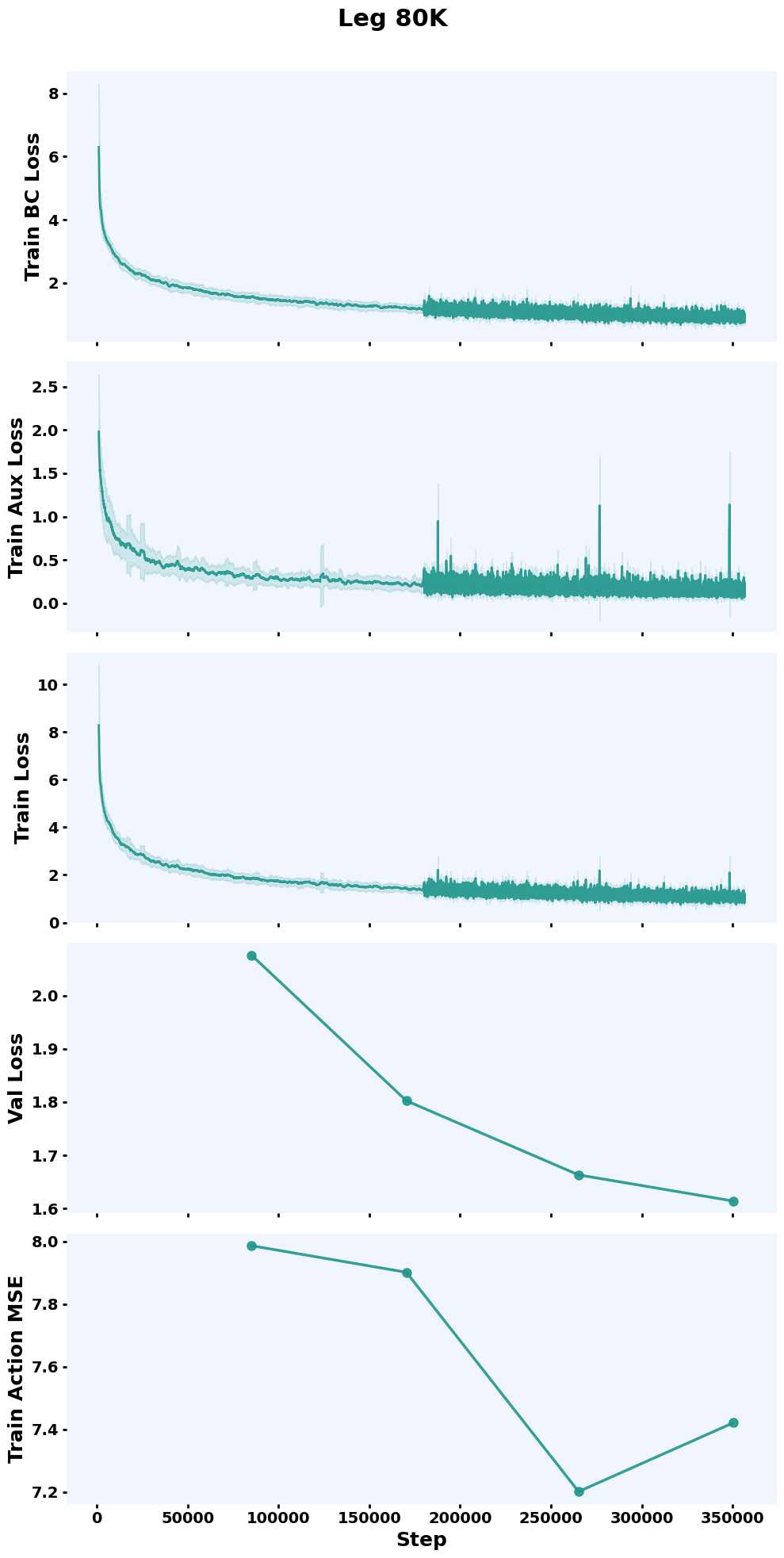
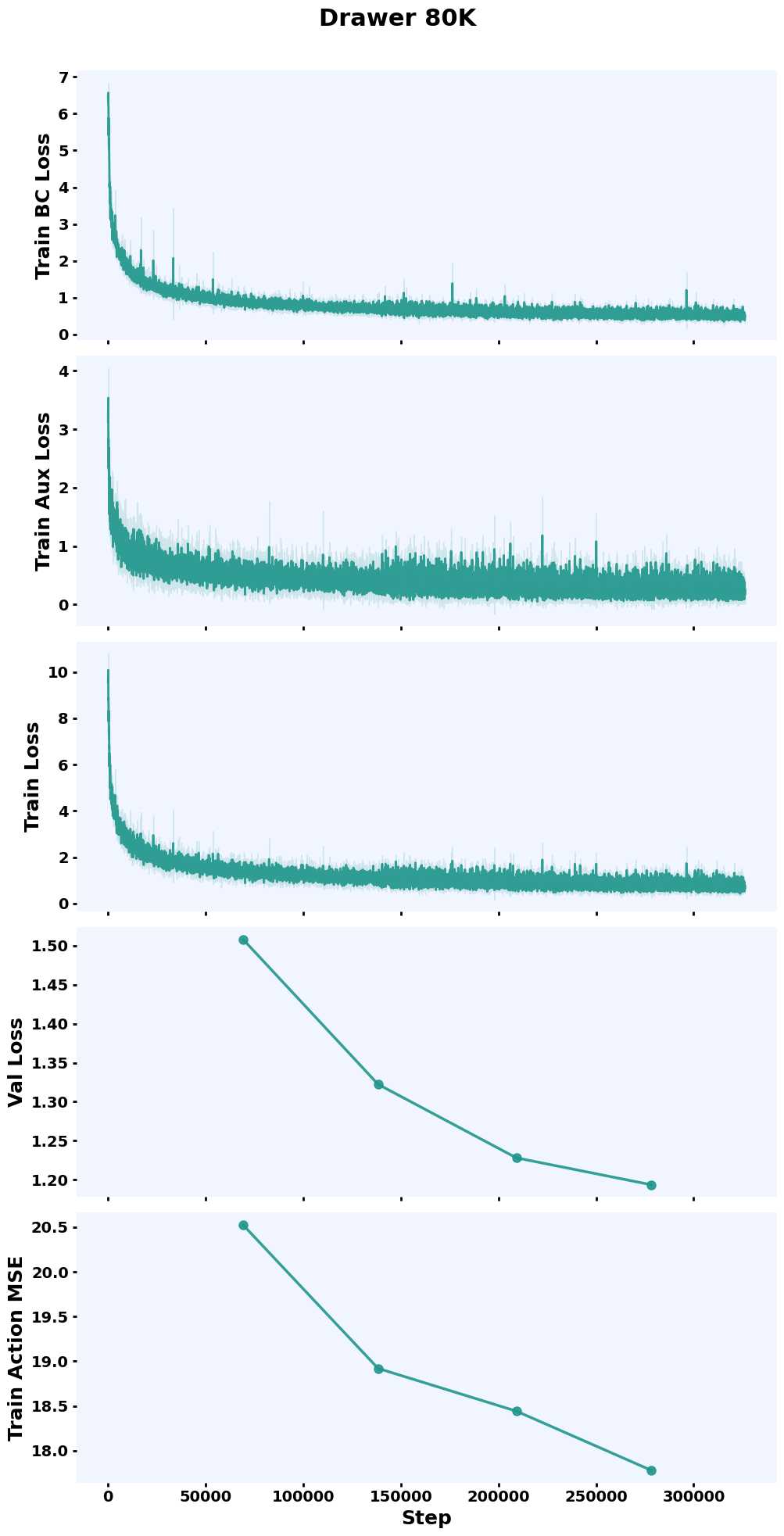
For sim2real, train for 350K iterations (~2 days on a single H200). Sim performance should start being reasonable within ~1 day of training.
Training Curves
Evaluate in Simulation#
Evaluate the trained vision policy in simulation. All commands below run in env_uwlab from the UWLab directory.
In-distribution:
python scripts_v2/tools/eval_distilled_policy.py \
    --task OmniReset-Ur5eRobotiq2f85-RelCartesianOSC-RGB-Play-v0 \
    --checkpoint <path_to_checkpoint>.ckpt \
    --num_envs 32 \
    --num_trajectories 100 \
    --visualizer none \
    --save_video \
    env.scene.insertive_object=peg \
    env.scene.receptive_object=peghole
Out-of-distribution (OOD) lighting and textures:
python scripts_v2/tools/eval_distilled_policy.py \
    --task OmniReset-Ur5eRobotiq2f85-RelCartesianOSC-RGB-OOD-Play-v0 \
    --checkpoint <path_to_checkpoint>.ckpt \
    --num_envs 32 \
    --num_trajectories 100 \
    --visualizer none \
    env.scene.insertive_object=peg \
    env.scene.receptive_object=peghole
In-distribution:
python scripts_v2/tools/eval_distilled_policy.py \
    --task OmniReset-Ur5eRobotiq2f85-RelCartesianOSC-RGB-Play-v0 \
    --checkpoint <path_to_checkpoint>.ckpt \
    --num_envs 32 \
    --num_trajectories 100 \
    --visualizer none \
    --save_video \
    env.scene.insertive_object=fbleg \
    env.scene.receptive_object=fbtabletop
Out-of-distribution (OOD) lighting and textures:
python scripts_v2/tools/eval_distilled_policy.py \
    --task OmniReset-Ur5eRobotiq2f85-RelCartesianOSC-RGB-OOD-Play-v0 \
    --checkpoint <path_to_checkpoint>.ckpt \
    --num_envs 32 \
    --num_trajectories 100 \
    --visualizer none \
    env.scene.insertive_object=fbleg \
    env.scene.receptive_object=fbtabletop
In-distribution:
python scripts_v2/tools/eval_distilled_policy.py \
    --task OmniReset-Ur5eRobotiq2f85-RelCartesianOSC-RGB-Play-v0 \
    --checkpoint <path_to_checkpoint>.ckpt \
    --num_envs 32 \
    --num_trajectories 100 \
    --visualizer none \
    --save_video \
    env.scene.insertive_object=fbdrawerbottom \
    env.scene.receptive_object=fbdrawerbox
Out-of-distribution (OOD) lighting and textures:
python scripts_v2/tools/eval_distilled_policy.py \
    --task OmniReset-Ur5eRobotiq2f85-RelCartesianOSC-RGB-OOD-Play-v0 \
    --checkpoint <path_to_checkpoint>.ckpt \
    --num_envs 32 \
    --num_trajectories 100 \
    --visualizer none \
    env.scene.insertive_object=fbdrawerbottom \
    env.scene.receptive_object=fbdrawerbox
The OOD task applies domain randomization to visual observations to test robustness before real deployment.
Deploy on Real Robot#
After training a vision policy (or using a pretrained checkpoint above):
Ensure your cameras are physically mounted to match the calibrated poses (see Calibrate Cameras in the Sim2Real guide).
Copy the checkpoint to the real-robot machine.
Run the evaluation script from the diffusion_policy repo (
omniresetbranch):
conda activate robodiff_real
cd <parent_dir>/diffusion_policy
python eval_real_robot.py \
    --input <path_to_checkpoint>.ckpt \
    --output ./demo \
    --robot_ip 192.168.1.10 \
    -j